
Most business owners see web design as window dressing. Pretty colours, nice fonts, maybe a logo refresh. But here’s the reality: your website design is either pushing visitors toward action or quietly turning them away. For assisted living facilities and e-commerce brands, this isn’t about aesthetics. It’s about revenue. Strategic web design directly influences whether a family books a tour or a shopper completes checkout. Every layout choice, every button placement, every loading second shapes conversion rates. This article shows you exactly how design drives conversions and what you can do about it.
Table of Contents
- Key takeaways
- Understanding web design’s impact on conversion rates
- Key web design elements that boost conversions
- How user experience (UX) design enhances conversions
- Applying conversion-focused web design to assisted living and e-commerce
- Explore expert web design services to increase your conversions
- Frequently asked questions about the role of web design in conversion
Key Takeaways
| Point | Details |
|---|---|
| CTA driven design | Strategic placement, contrast and wording ensure visitors know what to do next and increase click rates. |
| Mobile optimisation matters | With over sixty per cent of traffic from mobile devices, sites must perform well on small screens. |
| Load speed matters | Every loading second influences bounce rates and conversion success. |
| Trust signals boost legitimacy | Testimonials near enquiry forms, professional photography and clean layouts reinforce credibility and encourage action. |
Understanding web design’s impact on conversion rates
Your website creates a first impression faster than you can blink. Within 50 milliseconds, visitors form opinions about your credibility, professionalism, and trustworthiness. That snap judgement determines whether they stay or leave. For assisted living facilities, families researching care options need immediate reassurance. For e-commerce brands, shoppers demand confidence before they hand over payment details. Conversion-focused design enhances user trust by strategically arranging visual elements that communicate authority and reliability.
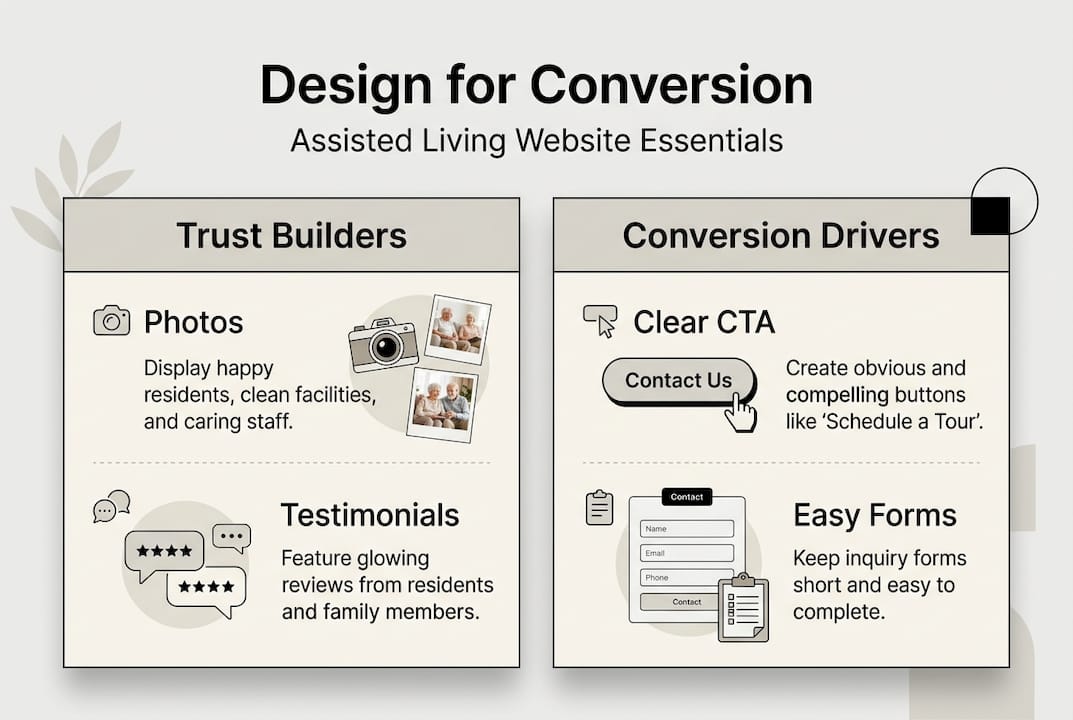
Trust signals matter enormously. Testimonials positioned near enquiry forms, professional photography showcasing real facilities or products, and clean layouts free from clutter all contribute to perceived legitimacy. When visitors trust your site, they’re willing to take the next step. Conversely, outdated designs, broken links, or confusing navigation trigger immediate scepticism. You lose potential customers before they even read your content.
Navigation plays a critical role in conversion rates. Clear menus, logical page hierarchies, and intuitive pathways reduce friction. If a family can’t quickly find information about care services or pricing, they’ll leave. If an e-commerce shopper can’t locate product categories or checkout, they’ll abandon their cart. Every extra click or moment of confusion increases bounce rates. Effective web design aligns with business goals by creating obvious routes to conversion points.
The balance between aesthetics and functionality defines successful design. Beautiful visuals attract attention, but functionality converts visitors. Your site must load quickly, display correctly across devices, and present information in digestible chunks. Walls of text overwhelm readers. Strategic use of whitespace, headings, and visual breaks guides eyes toward key messages and action buttons.
Pro Tip: Audit your current website by asking three questions: Does it load in under three seconds? Can visitors find contact information within five seconds? Does every page have a clear next step? If you answered no to any, conversions are suffering.
“Design is not just what it looks like and feels like. Design is how it works.” This principle applies directly to conversion optimisation. Your website must work for your business goals, not just look impressive.
Key web design elements that boost conversions
Calls-to-action represent the single most important conversion element. A CTA tells visitors exactly what to do next: “Book a Tour,” “Add to Basket,” “Get a Quote.” Placement, colour contrast, and wording all influence click rates. CTAs positioned above the fold (visible without scrolling) capture immediate attention. Contrasting colours make buttons stand out against backgrounds. Action-oriented language creates urgency and clarity.
Calls-to-action and mobile optimisation work together to capture modern users. Over 60% of website traffic now comes from mobile devices. If your site doesn’t adapt seamlessly to smaller screens, you’re losing more than half your potential conversions. Responsive design ensures buttons remain clickable, text stays readable, and images scale appropriately regardless of device.
Load speed directly impacts bounce rates and conversion success. Studies consistently show that pages taking longer than three seconds to load lose nearly half their visitors. Every additional second compounds the problem. For e-commerce sites, slow loading during checkout causes cart abandonment. For assisted living facilities, families researching multiple options won’t wait for sluggish pages. Optimising images, minimising code, and using quality hosting all contribute to faster performance.
Visual hierarchy guides attention strategically. Your most important messages, offers, and conversion points should dominate the visual field. Larger headings, bold text, and strategic colour use draw eyes exactly where you want them. Secondary information supports without distracting. For assisted living websites, this might mean highlighting care quality and family testimonials prominently. For e-commerce, product benefits and pricing take centre stage.
| Element | Low conversion design | High conversion design |
|---|---|---|
| CTA buttons | Generic “Submit” or “Click Here” | Specific “Book Your Tour Today” or “Start Shopping” |
| Mobile layout | Desktop site squeezed onto small screen | Fully responsive with touch-friendly buttons |
| Load time | 5+ seconds with large unoptimised images | Under 3 seconds with compressed media |
| Visual hierarchy | Equal emphasis on all elements | Clear focal points guiding user attention |
| Accessibility | Small text, low contrast, no alt text | Readable fonts, high contrast, full accessibility |
Accessibility ensures everyone can interact with your content. This includes users with visual impairments, motor difficulties, or cognitive differences. Proper heading structure, alt text for images, keyboard navigation, and sufficient colour contrast aren’t just ethical considerations. They expand your potential customer base and often improve overall usability for all visitors.
Pro Tip: Run your website through Google’s PageSpeed Insights and WAVE accessibility checker. Both free tools identify specific problems preventing optimal conversions and provide actionable fixes.
- Position primary CTAs above the fold on every key page
- Test button colours against your brand palette for maximum contrast
- Ensure mobile users can tap buttons easily without zooming
- Compress images to under 200KB without sacrificing quality
- Use descriptive CTA text that tells users exactly what happens next
How user experience (UX) design enhances conversions
User experience encompasses every interaction a visitor has with your website. It’s the feeling of ease or frustration, clarity or confusion, satisfaction or annoyance. Positive UX removes obstacles between interest and action. For assisted living facilities, this means families can quickly understand care options, view facilities, and request information without hunting through confusing menus. For e-commerce brands, it means shoppers move from product discovery to checkout in as few steps as possible.

Streamlining navigation and sales funnels directly improves conversion rates. Every unnecessary form field, every extra page between product and purchase, every unclear instruction costs you customers. Positive UX design significantly increases engagement by respecting users’ time and intelligence. Analyse your current conversion paths. Can you eliminate steps? Simplify forms? Provide clearer guidance?
Personalisation creates relevance. When content adapts to user behaviour or preferences, engagement increases. E-commerce sites showing recommended products based on browsing history convert better than generic catalogues. Assisted living websites highlighting services relevant to specific care needs resonate more than one-size-fits-all messaging. Even simple personalisation like addressing returning visitors differently from new ones builds connection.
Consistent branding across your website builds recognition and trust. Colours, fonts, tone of voice, and imagery should align throughout every page. Inconsistency creates doubt. If your homepage looks professional but your contact page feels outdated, visitors question your attention to detail. For businesses where trust matters enormously, like assisted living, consistency signals reliability and competence.
Testing and iteration separate good UX from exceptional UX. No designer gets everything perfect on the first attempt. A/B testing different layouts, button positions, or headline variations reveals what actually works for your specific audience. Heat mapping shows where users click and scroll. Session recordings expose friction points you never anticipated. Continuous refinement based on real user behaviour optimises conversions over time.
- Map your current user journeys from landing page to conversion
- Identify friction points where users hesitate or abandon
- Simplify forms by removing non-essential fields
- Test different conversion paths to find the most efficient route
- Implement user feedback mechanisms to understand pain points
- Review analytics monthly to spot emerging UX problems
- Update designs based on data rather than assumptions
“Good design is obvious. Great design is transparent.” When UX works properly, users don’t notice the design at all. They simply accomplish their goals effortlessly, which is exactly when conversions happen naturally.
Applying conversion-focused web design to assisted living and e-commerce
Successful implementation starts with understanding your specific audience’s needs and motivations. Families researching assisted living care about safety, quality of life, staff qualifications, and facility atmosphere. They want virtual tours, testimonials from other families, clear pricing information, and easy ways to schedule visits. E-commerce shoppers prioritise product details, customer reviews, transparent shipping costs, and secure checkout. Your design must address these specific priorities prominently.
Optimising key pages delivers the biggest conversion impact. Your homepage sets expectations and directs traffic to conversion paths. Product or service pages must answer questions and overcome objections. Contact pages need multiple engagement options accommodating different preferences. For assisted living sites, a dedicated “Schedule a Tour” page with calendar integration removes booking friction. For e-commerce, streamlined checkout with guest options and multiple payment methods reduces cart abandonment.
A/B testing provides concrete evidence about what works. Test one variable at a time: headline variations, CTA button colours, form lengths, or image choices. Run tests long enough to gather statistically significant data, typically several hundred conversions per variation. Small changes often produce surprising results. A button colour shift might boost clicks by 15%. A headline rewrite could increase enquiries by 25%.
| Metric | What it measures | Conversion impact |
|---|---|---|
| Bounce rate | Percentage leaving after viewing one page | High bounce rates indicate poor relevance or UX |
| Average session duration | Time spent on site per visit | Longer sessions suggest engaging content |
| Pages per session | Number of pages viewed per visit | More pages indicate effective navigation |
| Conversion rate | Percentage completing desired action | Direct measure of design effectiveness |
| Cart abandonment rate | E-commerce shoppers leaving before purchase | Identifies checkout friction points |
| Form completion rate | Visitors who start and finish forms | Reveals form usability issues |
Tracking key performance indicators (KPIs) connects design changes to business outcomes. Set up conversion tracking in Google Analytics or your preferred platform. Monitor how changes affect bounce rates, session duration, and conversion volume. For assisted living facilities, track enquiry form submissions, phone calls, and tour bookings. For e-commerce, monitor add-to-cart rates, checkout initiations, and completed purchases.
Regular updates maintain conversion performance. User expectations evolve. Competitors improve their sites. Technology advances. What worked brilliantly two years ago might feel dated today. Schedule quarterly design reviews examining both analytics and qualitative feedback. Stay current with design trends in your sector without chasing every fad.
Pro Tip: Create a conversion optimisation calendar. Monthly: review analytics and identify underperforming pages. Quarterly: implement and test one significant design improvement. Annually: conduct a full website audit comparing your site against top competitors and current best practices.
- Audit competitor websites to identify effective design patterns in your sector
- Create user personas representing your ideal customers’ goals and pain points
- Prioritise mobile experience since most traffic comes from smartphones
- Implement live chat or chatbots to answer questions in real-time
- Use social proof strategically: testimonials, reviews, case studies, trust badges
- Simplify checkout or enquiry processes to absolute minimum required steps
- Test different value propositions in headlines to find most compelling messaging
Explore expert web design services to increase your conversions
Implementing conversion-focused design requires specialised expertise and ongoing optimisation. At NU Life Digital, we engineer websites specifically to convert visitors into customers. Our approach combines data-driven design principles with deep understanding of assisted living and e-commerce sectors. We don’t just make sites look good. We build growth engines that generate measurable revenue increases.
Our web design services focus exclusively on conversion outcomes. Every layout decision, every interaction element, every piece of content serves your business goals. For assisted living facilities, we create websites that build trust immediately and make booking tours effortless. For e-commerce brands, we design shopping experiences that guide visitors smoothly from discovery to purchase. Our e-commerce solutions integrate conversion optimisation with technical performance, ensuring your site handles growth without compromising speed or user experience. When you partner with a specialist digital agency, you gain access to expertise that transforms your website from a digital brochure into your most effective sales tool.
Frequently asked questions about the role of web design in conversion
How does web design increase conversion rates?
Web design increases conversions by building trust through professional appearance, guiding visitors toward desired actions with clear CTAs and intuitive navigation, and removing friction from decision-making processes. Strategic layout, fast loading, and mobile optimisation all contribute to higher conversion rates by making it easier for visitors to take action.
What are the most important design elements for e-commerce conversions?
The most critical elements include clear product photography, detailed descriptions addressing common questions, prominent CTAs like “Add to Basket,” streamlined checkout with minimal steps, trust signals such as security badges and customer reviews, and mobile-responsive design. Fast loading and easy navigation between product categories also significantly impact e-commerce conversion rates.
Can web design improve conversions for assisted living websites?
Absolutely. Assisted living websites benefit enormously from design that builds trust through professional imagery, staff credentials, and family testimonials. Clear information architecture helps families quickly find care options, pricing, and facility details. Prominent booking CTAs for tours, combined with easy contact methods, directly increase enquiry rates. Web design services tailored to assisted living address the unique emotional and practical needs families face when researching care options.
How often should I update my website design to maintain conversions?
Major redesigns typically occur every two to three years to stay current with design trends and technology. However, continuous optimisation should happen quarterly, testing and refining specific elements based on performance data. Monthly analytics reviews identify emerging issues requiring immediate attention. Regular updates ensure your site remains competitive and conversion-focused as user expectations evolve.
Are professional design services worth the investment for small businesses?
Professional design services deliver substantial return on investment by increasing conversion rates, which directly impacts revenue. A well-designed website converting at 3% instead of 1% triples your customer acquisition from existing traffic. For small businesses with limited marketing budgets, maximising conversions from current visitors often proves more cost-effective than driving more traffic to a poorly converting site. The expertise, testing capabilities, and ongoing optimisation professional services provide typically pay for themselves within months through increased sales or enquiries.